My Desk
My Desk is your page in the tracker. The assistant you can talk to, your watchlists, and the alerts you've saved — all in one place.
Everything on it is yours. None of it is published by PPP, and nobody else can see it.
What's on it
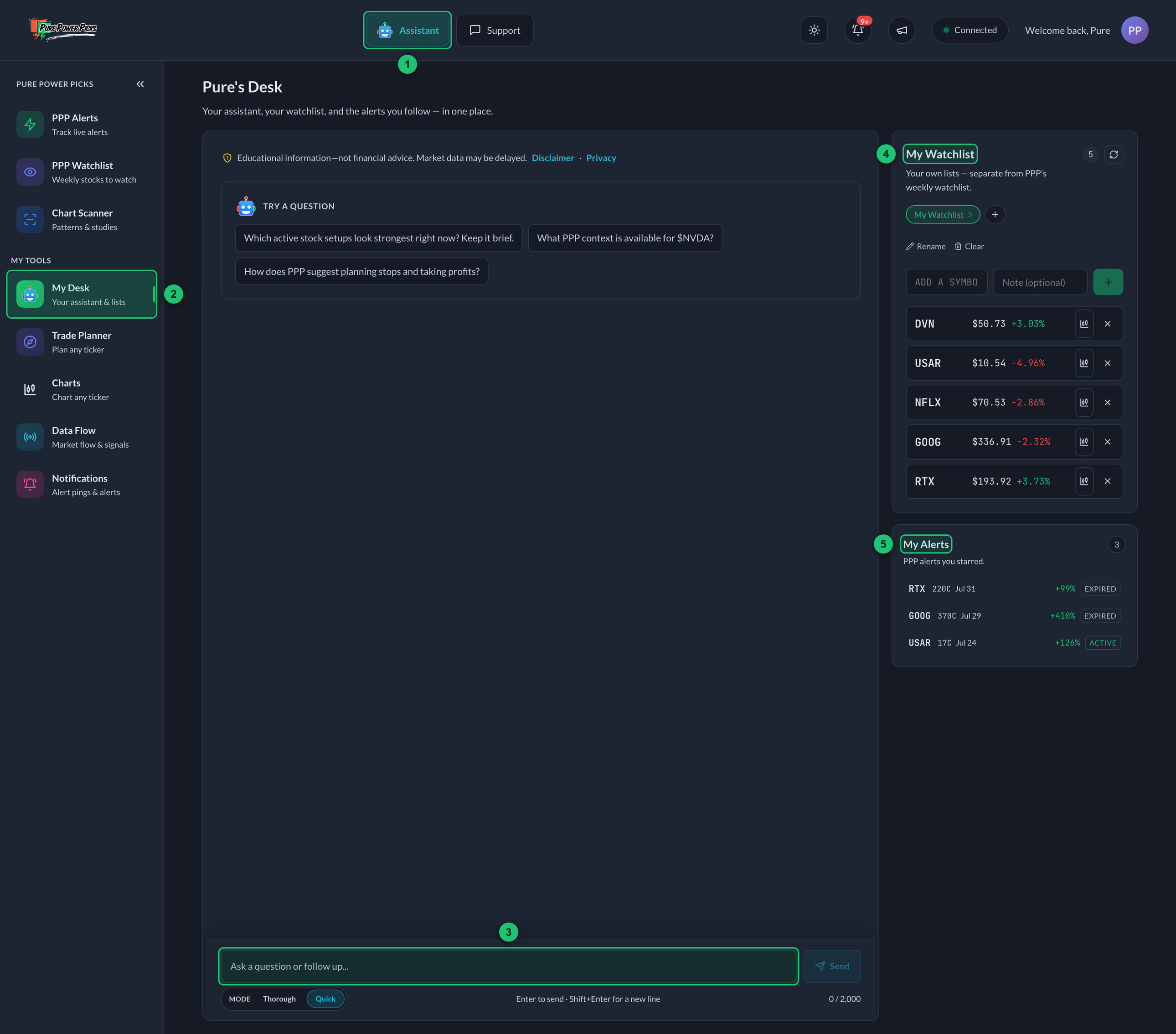
My Desk on a desktop, with a new chat open.
① Assistant button — the same assistant, opened over any page. ② My Desk — where this page sits in the sidebar. ③ The assistant — type a question in the message box. ④ My Watchlist — your own lists of stocks. ⑤ My Alerts — the PPP alerts you've starred.
The assistant
The PPP AI Assistant, same as the button in the header, just with room to read a long answer without scrolling a small box. Ask it about a stock, an alert, the watchlist, or how the tracker works.
My Watchlist
Your own lists of stocks, with your notes. Add to them yourself, or just ask the assistant. See My Watchlist.
My Alerts
The PPP alerts you've starred — sitting right next to the assistant that can tell you how they're doing. See My Alerts.
On a phone
Same three things, arranged for a small screen. You land on the chat, with Chat · Watchlist · My Alerts as tabs across the top — tap a tab to switch. The chat fills the screen, so the message box stays put when the keyboard opens and you never have to scroll the page to reach it.
Switching tabs doesn't lose anything. An answer still being written keeps writing, and anything half-typed is still there when you come back.
Tapping a stock on your watchlist drops a question about it into the chat and takes you straight there.
They sound alike, so:
- PPP Alerts — the alerts we put out.
- PPP Watchlist — the stocks we're watching this week.
- My Alerts — the PPP alerts you starred.
- My Watchlist — your own lists of stocks.
PPP means we made it. My means you did.
On your phone
My Desk is in the bar along the bottom. While an answer is coming in, the page holds still so you can read from the top of it instead of chasing the last line down the screen. If there's more below, a Jump to latest button shows up — nothing moves you around unless you ask it to.