AI Credits
The AI tools — the assistant and the Trade Planner — run on real computing power every time you use them. Credits are how that gets shared fairly: your membership comes with a weekly allowance, and the meter in your account menu (tap your avatar, top right) shows where yours stands this week.
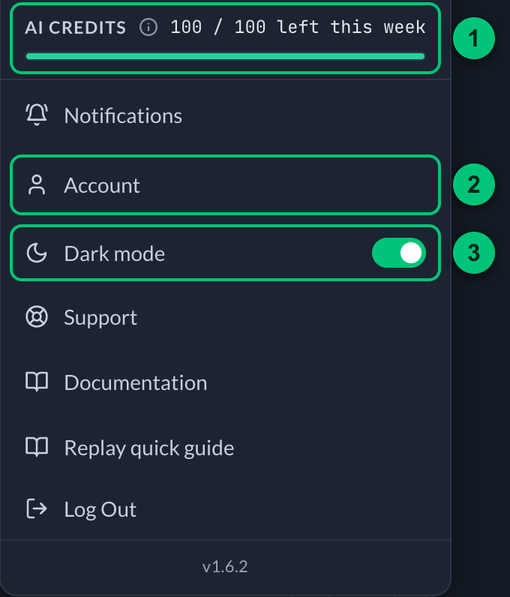
The account menu, opened from your avatar.
① AI Credits — the meter, with how many credits are left this week. ② Account — opens your Account page. ③ Dark mode — the switch for how the app looks on this device.
What uses credits
| Action | Credits |
|---|---|
| Assistant answer — Quick | 1 |
| Assistant answer — Thorough | 2 |
| Trade plan | 6 |
A trade plan costs more because it genuinely does more work — it pulls the chart, options positioning, news, and financials, and reasons over all of it.
What never uses credits
Everything else. Browsing alerts, the Watchlist, Data Flow, Charts, your Desk, notifications, the docs — none of it draws credits, ever. Credits only apply where each use has a real cost behind it.
The allowance
Your membership sets your weekly allowance:
| Membership | Credits a week |
|---|---|
| Full Membership (Options Trade Alerts and Trading Room plans) | 100 |
| Alerts-only membership (Trading Alerts plans) | 20 |
Twenty credits covers, for example, two trade plans and eight Quick answers. The allowance refills every Sunday at midnight Eastern — simple as that. The week runs Sunday through Saturday, so a full allowance is waiting when the new week's prep starts. When you're running low, the meter turns amber and a small dot appears on your avatar so you're never caught off guard. Your usage is your own: it's counted per account, and nobody else's activity affects your meter. The allowance is a real limit, not just a display: at zero, the AI tools pause until the week turns over. Nothing is ever charged for going over, and the allowance may be tuned as we learn how members actually use the tools.
Most products hide their limits and let you slam into them. We'd rather you see the meter from day one, know exactly what things cost, and never be surprised.