Reading an Alert
Click any alert on the home page to open its detail page — the complete picture of a single idea. This is where the thesis, the exact price levels, the charts, and your own notes all live in one place.
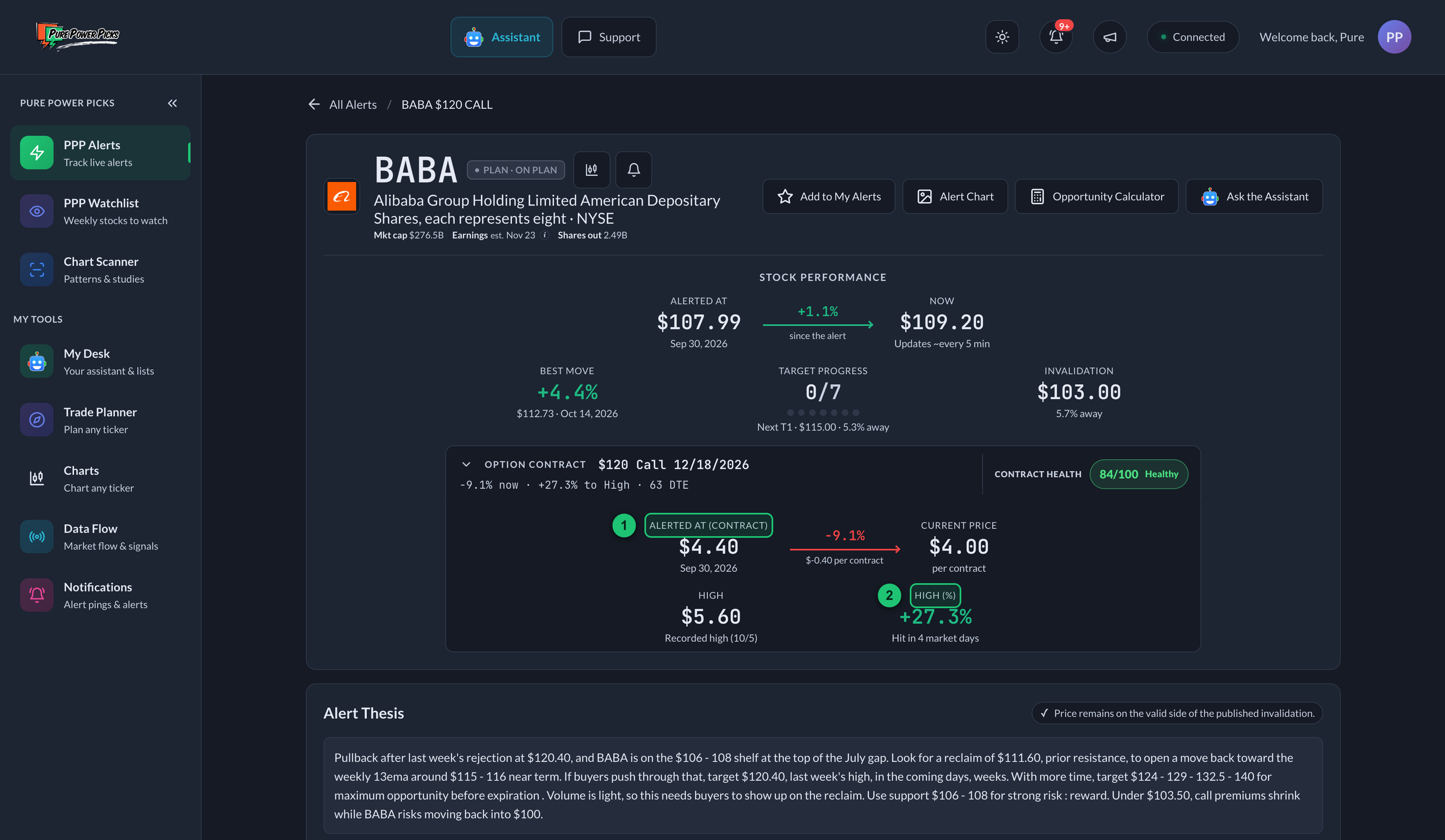
① Alerted At (Contract) — the baseline price the contract is measured from. ② High (%) — how far the contract ran at its High (formerly Max Opp %), and how many market days it took. The opportunity tiers (Conservative / Moderate / Optimistic) sit further down the page.
The header
At the top you'll find the alert's identity and its main actions:
- Ticker, company name, and exchange, with current Plan State and any separate +50% Contract Delivered result beside them. Once the option contract expires, Final Review leads when proven while lifecycle and historical achievements remain recorded.
- Next earnings date, shown quietly with the company details when one is available. A projected date is labeled est.; hover over or tap it to see the uncertainty note. Scheduled dates can change.
- ⭐ Add to My Alerts — save it to your synced list.
- Follow — get notified as this alert progresses.
- 🖼 Alert Chart — pop open the exact chart image that was sent out with the alert. It's a static snapshot from that moment, so the levels and candles are frozen in time — for current pricing, use the live chart further down the page. (Only on alerts recent enough to have shipped with one.)
- Small chart shortcut beside the ticker — jumps directly to the full interactive chart already on this page without taking another action-button slot.
- 🧮 Opportunity Calculator — open the what‑if heat map.
- 🤖 Ask the Assistant — opens the AI Assistant over this page with "What's the latest on TICKER, and has anything changed since PPP alerted it?" already typed in. It reads the thesis and levels off the alert and measures where the stock is now against them. The alert stays visible behind it. It asks straight away — you tapped it because you want the answer, not a filled-in box.
The metrics: the plan first
The header leads with the stock — the idea itself — and keeps the option contract one click away.
Stock Performance
The alert read on the underlying, using the same numbers and methodology as the Stock view of the alerts table. It opens with the price journey — Alerted At → Now as one from-and-to line, with the move riding the arrow between them:
- Alerted At — the tracked stock baseline for the alert.
- The arrow — the stock's move since Alerted At, colored by whether it favors the idea (a drop is green for a bearish idea).
- Now — the underlying's current price (updates about every 5 minutes).
Under the journey sit the three judgment numbers:
- Best Move — the best favorable stock move recorded after the alert, and when. It records opportunity that appeared, not a realized result.
- Target Progress — how many published targets have been reached out of the total, one dot per target, and how far away the next one is. Reached targets stay credited after a pullback.
- Invalidation — the published level and its distance from the current price. Once price is through it, this reads “x% past level” rather than a distance away.
The distance readout is live and uses the exact published level. Crossing it intraday puts Plan State Under Pressure while the tracker waits for the close. Invalidated requires a daily close beyond that exact level; an open or wick that recovers by the close does not confirm it. A confirmed invalidation stays in the original plan's record after a later recovery.
The Option Contract row
Beneath it sits a single row naming the contract and its headline numbers:
› OPTION CONTRACT $62.50 Call 10/16/2026 · +14.4% now · +19.8% to High · 83 DTE
It opens expanded, showing the contract's own price journey — Alerted At (Contract) → Current Price, with the Current % on the arrow — and its High and High (%) beneath. The strike and expiration live in the row's title, so they aren't repeated inside. Click the row to collapse it back to the single line if you only follow the stock. The tracker remembers whichever way you leave it, so your choice carries to every alert.
The row adapts to the contract's state: it reads Awaiting bid while the alerted bid hasn't filled, marks a rebased baseline as (tracked), and shows Contract expired with the final change to High once the contract has lapsed.
Some older alerts were sent before a stock baseline was captured. On those the contract detail always stays expanded, since the contract numbers are all that's available.
Alert Thesis
The first card is the Alert Thesis: the original thesis exactly as published, plus the canonical Plan State explanation. It does not use contract performance to decide whether the stock plan is valid.
Stock Chart & Price Levels
This is the full Charts tool, sitting on the alert page with the alert's plan already drawn on it. Every timeframe, every study and every drawing tool works here exactly as it does on the Charts page.
The alert's levels
- Levels start at the alert bar — the plan's lines begin where the alert went out, not across all of history.
- The Alerted marker follows the idea. A CALL puts an arrow under the bar pointing up, with its label below. A PUT inverts: the arrow sits above the bar pointing down, label on top.
- Targets show their status. One already reached goes faint and stops at the bar that tagged it, with a dot on the price path. The next one ahead is the single bright line. Targets further out sit as short stubs by the right edge, and the price scale stays fitted to the action, so a far target may live off-screen until price works toward it — the Price Levels legend below always lists all of them.
- The support zone (resistance zone for a PUT) is one shaded band spanning the candles that actually traded through it, and the invalidation level is a red dashed line.
- Every level carries a name tag in the clear strip beside the price scale — a check on the ones already reached — so labels never sit on top of the candles; when two levels crowd together the tags fan apart with a thin line back to their level.
The levels are recalculated from the price data every time you open the page, so the moment a target is reached it reads as reached. Nothing is frozen in place.
Your own markup
Draw on it. Trend lines, boxes, text, anything in the toolbar — it saves, and it's still there when you come back. Your drawings are kept per alert, so marking up one alert's chart doesn't put lines on every other alert for the same ticker, or on your Charts page. Your timeframe is remembered per alert too.
The alert's own levels are not drawings — you can't drag them out of place, and nothing you draw can be overwritten by them.
Take the levels with you
Two copy buttons sit at the top of the Price Levels panel, with a small ⓘ beside them that repeats these steps right in the app:
- Copy levels puts every published level on your clipboard as plain text — paste it into your notes, a message, or any platform.
- TradingView copies a small script that draws all of the alert's levels across your own TradingView chart, in the tracker's colors, on any timeframe.
Using the TradingView copy — no coding involved:
- On the alert page, press TradingView. The button flips to "Copied" — the script is on your clipboard.
- In TradingView, open the chart for that stock and click Pine Editor along the bottom of the screen.
- Click inside the editor, select everything already there (Ctrl+A / Cmd+A), and paste.
- Press Add to chart at the top-right of the editor.
Every level appears instantly — the zone as a shaded box, targets and the invalidation as labelled lines — and an Alerted marker points at the candle the alert went out on whenever that date is inside the chart's loaded history. It all behaves like any indicator: hide it from the object tree, or remove it and paste a different alert's script whenever you like. Each alert's script is named after the ticker and alert date, so you always know which plan you're looking at.
TradingView doesn't let outside apps draw on your charts directly, so a one-paste script is the closest thing to a true import.
The Price Levels legend
Directly beneath the chart, the Price Levels the chart is drawing — the support zone (resistance zone for a PUT), any additional distinct support/resistance levels, the potential breakout or breakdown spot when the alert names one, every published target, and the invalidation level, each with its current status (hit Jul 13, 2026, next target, not yet reached, risk level), a check beside any the stock has already reached, and a dot where price is sitting within 2% of a level. A confirmed daily close beyond invalidation is dated and remains part of the original plan's record after a later recovery.
It's also the chart's control panel:
- Alert plan On / Off is one master switch. It shows or hides every published level plus the Alerted marker together, while the full level list remains readable below the chart.
- Your own drawings are separate from that switch and are never erased when the alert plan is hidden.
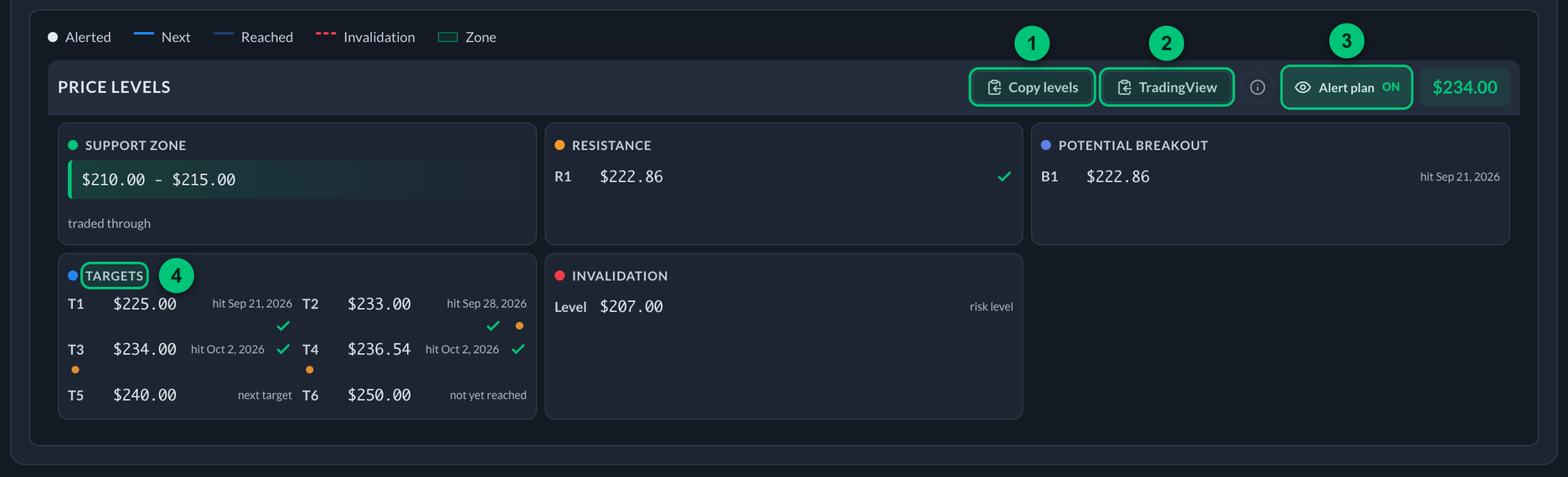
Each level carries its status: the date it was hit, next target, not yet reached, or risk level.
① Copy levels — puts every published level on your clipboard as plain text. ② TradingView — copies a script that draws the levels on your own TradingView chart. ③ Alert plan On / Off — shows or hides the plan on the chart above. ④ Targets — every published target with its status, and a check once reached.
These levels used to appear in three separate places on this page. They're now in one, under the chart they belong to.
AI Analysis
An automatically generated, plain‑English breakdown of the alert. Outlook and Plan Risk consume the canonical Plan State so they cannot call an intraday wick a confirmed invalidation or let a +50% contract result hide a weakened stock plan. Contract drawdown and short time remaining appear separately as contract considerations; they do not rewrite Plan State.
Below that it expands into collapsible sections, gathered under three headings so the stock reads come first and the contract material sits lower:
The Stock
- Price Action, Technical Analysis, Volume Analysis — how the underlying has behaved, read against the direction the thesis expected.
- Target Timeline — every published stock target, whether it's been reached, and how many market days it took. The header's Target Progress is the summary; this is the detail behind it.
Risk, Catalysts & Outlook
- Plan Risk and Scenarios — the canonical stock-plan condition, separate contract considerations, and how the setup could play out.
- Earnings Alert and Market Context — upcoming catalysts and how SPY/QQQ and the sector are trading.
The Contract & Track Record
- Options Flow, Time Analysis — the contract's volume/open interest/IV and Greeks, and time decay.
- Historical Performance — how past alerts on this ticker have done.
Option Contract Detail
Everything priced in the option contract lives in one card: the opportunity tiers (Conservative +10–25%, Moderate +25–50%, Optimistic 50%+, each marked with the date it was reached) and the contract price history chart. It's open by default; collapse it if you only follow the stock, and the tracker remembers your choice.
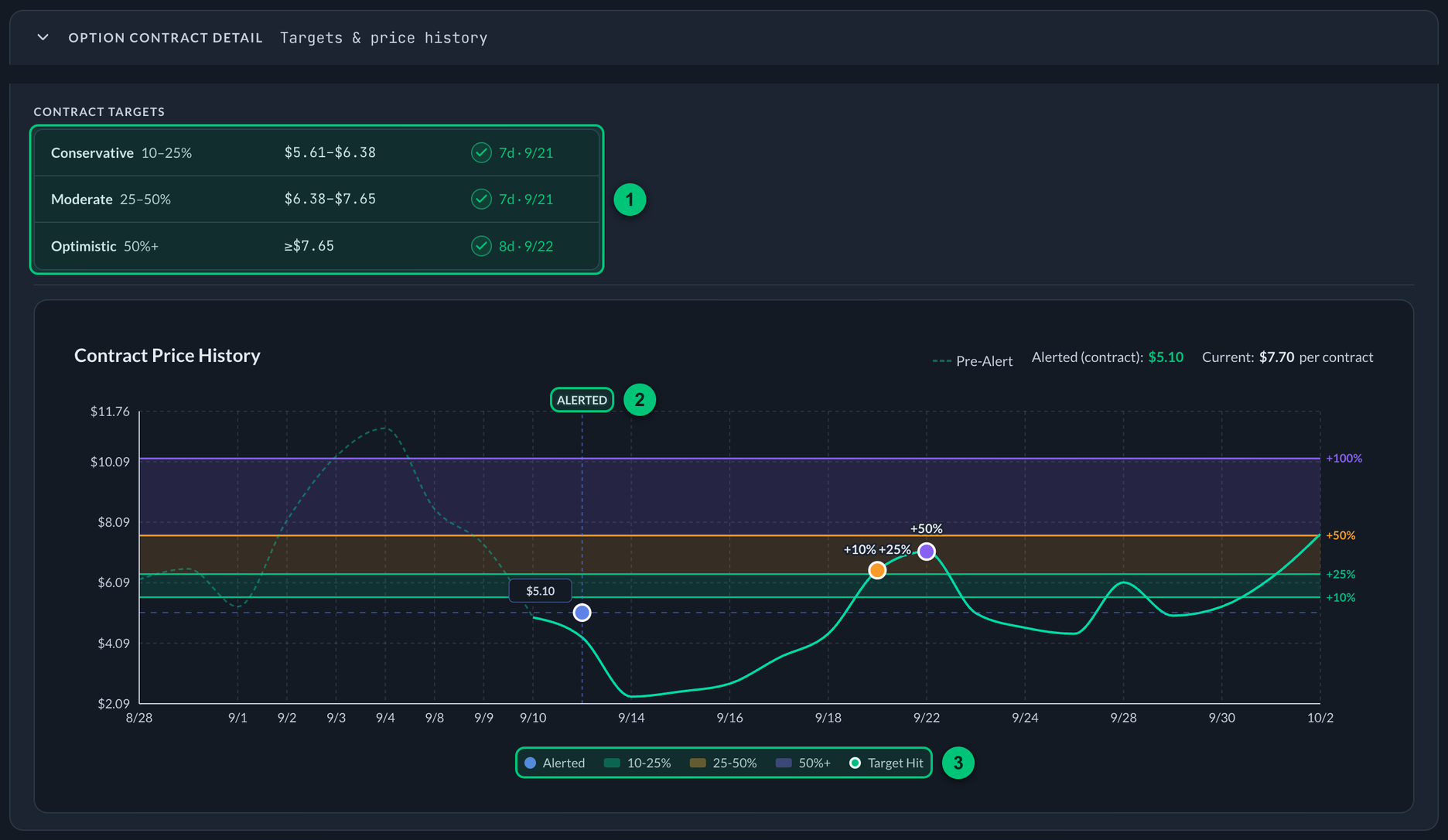
① Opportunity tiers — Conservative, Moderate and Optimistic, each with its price range and, once reached, how many days it took and the date. ② Alerted — where the alert went out; the dashed line before it is the contract's price before the alert. ③ Key — the shaded bands are the three tiers, and a dot marks where each was first reached.
Ticker News
News on TICKER is a compact feed of recent ticker-specific headlines from the PPP news channel. Expand the list for more, or open the original source post. Analyst and earnings updates are cleaned up for faster reading.
Your Notes
A private notes box where you can jot your own thoughts on the alert. Click Save and they're stored for you.
Your notes are saved in your browser on the device you wrote them on. They aren't synced across devices. Your starred alerts, by contrast, do sync everywhere you're signed in.
Activity Feed
At the bottom of the page, a timeline of everything that's happened to the alert: milestones reached, targets tagged, levels tested, status changes. A running history of the idea.
Next
- Opportunity Calculator → — explore hypothetical outcomes at any price and date.
- Alert Statuses & Final Review → — decode lifecycle, Plan State, contract results, and the expired path review.