PPP AI Assistant
The PPP AI Assistant is an AI you can talk to inside the tracker. Ask it about a stock, a PPP alert, the watchlist, or how something in the tracker works.
Every price, level and date it gives you is pulled fresh while it answers, so what you get is current rather than whatever it happened to know.
It'll explain things, walk you through the levels on a chart, and pull up PPP's record on any alert. It will never tell you what to buy or sell, how much to put in, or how many contracts to trade. That's not a quirk to work around — it's the line between teaching you something and giving you financial advice, and it doesn't move.
Where to find it
Two places, same assistant:
- The Assistant button in the header — opens a panel over whatever page you're on.
- My Desk — a full page with the chat, your watchlist, and your saved alerts together.
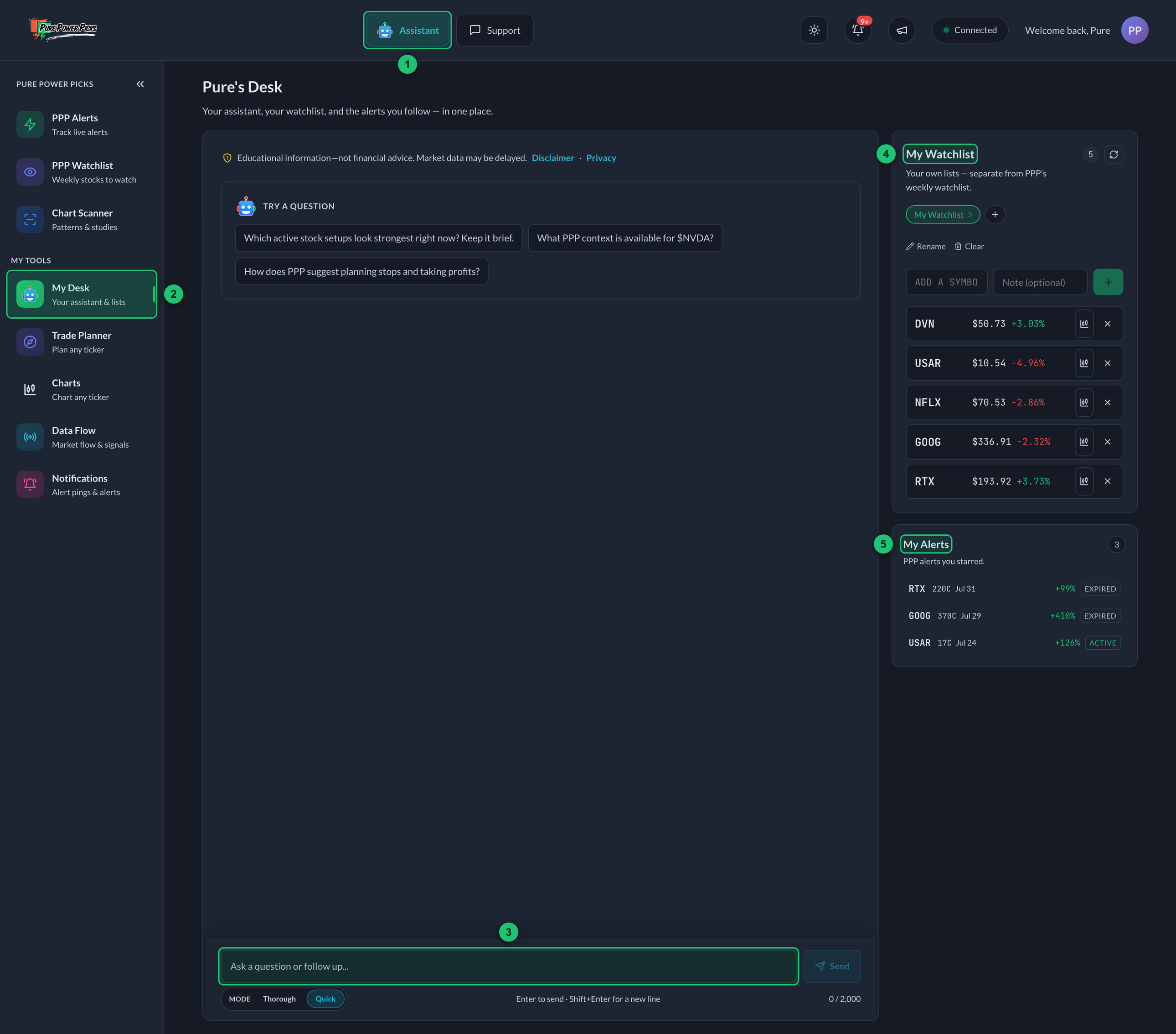
My Desk with a new chat open.
① Assistant button — opens the assistant over whatever page you're on. ② My Desk — the full page, in the sidebar. ③ Message box — where you type a question. ④ My Watchlist — your own lists. ⑤ My Alerts — the PPP alerts you starred.
Either way it picks up the same conversation where you left it, opens on your most recent message, and puts the cursor straight in the box. Scroll up any time to read back through it.
What it can look up
| Ask about | What it pulls |
|---|---|
| A stock | Price right now, including pre-market and after hours, the move on the day, its 52-week range, moving averages, momentum, volume against its average |
| A company | What they make or sell, how big they are, how many people work there, what industry they're in |
| PPP alerts | The whole record — alerted price, the thesis, the levels, the High, and for an open alert, how its contract is holding up on Contract Health and where the stock sits against the alert's levels before the open or after the close |
| PPP's track record | Across every expired alert: how often ideas reached +50% or +100% at their High, how long that took, how far they dipped first, and how far the risk level usually sits |
| The PPP Watchlist | Which weeks a stock showed up, and what we said about it |
| News | Headlines from several outlets, each with who published it and when |
| What's moving the market | The macro headlines off PPP's own curated news feed — the Fed, rates, tariffs, jobs numbers, big political news |
| The market before and after the bell | Where SPY, QQQ, IWM and DIA are trading in the pre-market (from 4am ET) and after hours (to 8pm ET) |
| How it reacted | What a stock or the market did minute by minute around a moment, like the 8:30 jobs report or a 2pm Fed decision |
| Economic calendar | When the next CPI, jobs report, PPI, PCE, GDP or Fed meeting lands, and which ones already came out this week |
| Earnings | When a company is expected to report next. It says "expected" because earnings calendars can be off by a day |
| Financials | The official filed numbers — revenue, margins, cash flow |
| Dividends | Dividend per share, how often it pays, the yield, the next ex-dividend and pay dates, and the last raise or cut |
| Options positioning | Open interest, gamma levels, how volatility is priced |
| Busiest options today | The contracts trading the most money in the current session, and the ones trading way above their open interest |
| Dark pool and block trades | Large off-exchange prints from PPP's signal feed — size, price, and share of the float. It will tell you a print has no direction, because it doesn't |
| How much it could move | What the options market has priced in between now and an expiry, as a percentage and a dollar range. Ask it before earnings, or whether a price is inside what's priced by Friday |
| Your watchlist | Your own lists — and it can add and remove stocks for you |
| Your saved alerts | The alerts you starred — and it can star and unstar them for you |
| The tracker itself | How statuses work, what the High means, how to use the calculator |
| The whole US market | Screen every listed stock on RSI and trend — oversold, overbought, what's pulled back inside an uptrend |
| Insider buying and selling | What officers and directors actually did with their own stock, from the SEC filings |
| SEC filings | What a company has filed and when — 8-Ks, annual and quarterly reports, big-stake disclosures |
| What a company said in a filing | It opens the document and quotes the company's own words — the outlook and targets from an earnings release, straight from the filing |
| Support | It can write up a problem and send it to the team for you |
What it won't do
- Tell you to buy, sell, hold, or how much to put in
- Ask what's in your account, or use it if you tell it anyway
- Pretend to be a person, or a licensed advisor or broker
- Place a trade or talk to your broker. It can't do anything outside the chat.
Ask it to update your watchlist
It can add to and tidy up My Watchlist. Just ask:
"add NVDA to my watchlist" "put AMD on my earnings list, note about the print" "drop TSLA from my swing list" "what's on my watchlist?"
It only ever touches your lists, and only the one you point it at.
Ask it to save an alert
Same for the alerts you're following on My Alerts:
"add the most recent alert to my alerts" "save the NVDA alert" "what alerts am I following?" "take the TSLA one off my list"
If we've put out a few alerts on that stock, it'll show you what it found and ask which one you meant, rather than saving the wrong one.
Ask what's busy in options today
Ask "hottest options contract today?" and it goes straight to the live chain — the contracts with the most money through them this session, and separately the ones trading far above their existing open interest, which is where the odd stuff usually shows up.
Ask for a specific stock and it digs into that chain instead: "what's busy in NVDA options right now?"
And if you don't want today's expiries, say so — "what about the August monthlies?", "go farther out", "non-0DTE". That switches it to contracts expiring a couple of weeks out or more, which is a different board entirely.
Three things worth knowing about the answer:
- The index ETFs win on size every day. SPY and QQQ same-day contracts out-trade every individual company, always. So it'll give you the honest top of the list and then the busiest single stocks underneath, which is usually the part you wanted.
- Volume doesn't tell you direction. A huge print in puts is as likely to be someone protecting stock they already own, or one leg of a spread, as it is anyone betting the stock falls. The tape shows what traded — never who wanted it or why.
- It scans a wide list, not every stock that exists. Roughly 130 of the most options-active names. Nobody sells a feed that ranks every US option by volume at once, so anything claiming to is guessing. Ask about a specific ticker and it goes straight to that chain, whether or not it's on the list.
- You get the further-out strikes too, without asking. Money piles up near the current price, so a straight "biggest dollars" list is the same handful of strikes every time. Alongside it you'll get the busiest contracts at least 4% away from the price, with how far out each one sits — so "anything deeper?" is already answered.
Quotes run about 15 minutes behind, and outside market hours you'll get the last session that traded. It'll tell you which day it's describing.
Ask what's setting up
You don't have to describe a filter. Just ask:
"what setups look good right now?" "anything setting up?" "anything breaking out on volume today?"
It knows a set of ordinary chart patterns and can scan every US-listed stock for them:
| Setup | What it means |
|---|---|
| Pullback in an uptrend | Come off its three-month high but still above its 20- and 50-day averages |
| Turning up after a fall | Last five sessions positive, the five before them negative |
| At a three-month high | On heavier volume than usual |
| Unusual volume | Traded three times its normal dollar volume |
| Average crossed up / down | The 20-day through the 50-day, within the last ten sessions |
| Overbought and stretched | RSI 70+ and more than 10% above its 20-day average |
| Breaking down | At three-month lows, under both averages |
| Coiling | Ten sessions inside a 3% range |
| Leading on momentum | Up 15%+ on the month and still trending |
Three things it does with those:
- It gives you the numbers it matched on. Not "a nice setup" — "6.2% below its three-month high with RSI at 47". One is a fact and the other is an opinion.
- It looks for a reason. A screen tells you what moved, never why. For the names worth mentioning it checks the news feed and the earnings calendar and tells you if something explains it, including when nothing does.
- It'll tell you when a setup found nothing. That's a real answer about the day, not a failed search.
Two limits worth knowing. This scan holds about three months of history, so its highs and lows are three-month highs and lows, not 52-week ones — ask about a single stock and you get five years. And a setup describes what a chart has already done. It's not a forecast, and "best" isn't a word it will use.
Ask it to screen the whole market
Not just PPP's names — every US-listed stock:
"what stocks are oversold right now?" "what's the most oversold name that's still in an uptrend?" "which stocks are most overbought today?"
Two things it does that matter:
- "Most oversold" is a ranking, not a cutoff. Most days nothing in a real uptrend is below the textbook RSI 30 line. Rather than telling you "none", it gives you the lowest-RSI names that are still trending up — which is what you were asking.
- It only returns names you could actually trade. There are around 12,800 listed lines in the US, and most are warrants, preferred shares, or funds trading a few thousand dollars a day. It filters to ordinary stocks over $5 with real daily volume, which is about 4,000 of them, and tells you how many it looked at.
It'll say what "uptrend" means when it uses the word: price above its 20-day average, and the 20-day above the 50-day. RSI is a momentum reading, not a signal — oversold means it's fallen hard, not that a bounce is due.
Ask what's about to move
You can ask it straight out:
"what stock looks ready to make a huge move this week?" "what's going to be volatile?" "any big moves coming?" "what's setting up right now?"
Nothing can scan for a move that hasn't happened yet, and it'll say so in a line rather than pretending otherwise. Then it answers anyway, with the closest honest measurement it has: where the options market repriced hardest. That means the names where volatility jumped, and the single contracts that traded far more money than they normally do.
You get the names, ranked, with what each one actually did. Two things it will always tell you, and they're the point:
- That ranking is of unusual option dollars, not of expected move size. It's a list of where money concentrated, not a list of what will move furthest.
- Volume is not direction. A big put print can be someone hedging stock they own, one leg of a spread, or a dealer's inventory. The tape never says who started it or why.
Name one of them and it'll go further on that stock — what size move the options are pricing in, and whether an earnings date falls inside the window.
Just ask what it thinks
You don't have to know what to ask for:
"any thoughts on ZETA?" "tell me about CRWD" "what does PLTR actually do?"
You'll get what the business is first, in a line or two: what they make or sell, how big they are, what industry they sit in. Then the price and the trend, then anything on the news feed. The point is that you shouldn't have to already know the company to get something useful back.
It'll also give you the competitive picture — who a company goes up against, what its niche is, what it's known for doing well. When that comes from what it knows rather than something it looked up, it says so, so you can tell the two apart.
Same for sectors. It'll tell you what's been driving one and why, and where that's measurable it'll measure it off an ETF that tracks the sector and name the one it used.
Three things it won't do, all on purpose:
- No made-up numbers about rivals. Market share, "third largest", "20% of the market" — those are figures, and every figure it gives you has to come from real data. It can tell you who the competitors are. It can't tell you the standings from memory.
- No crowning a winner. "Known for X" is context. "The best in the space" or "the one to own" is a recommendation wearing a costume, and it doesn't make those.
- No calling where a sector is heading. What's happened and why: yes. What happens next: no.
For what a company is actually good at, it reaches for the filed numbers instead of adjectives. "Revenue grew 24%, gross margin 62%" is a fact somebody filed. "Strong execution" is an opinion.
Ask what's moving the market
Not a stock. The whole tape:
"what's moving the market today?" "any big headlines this morning?" "what's the market reacting to?" "anything on the Fed?"
For this it reads PPP's own curated news feed — the channel in our Discord where we post the market-moving stuff as it lands. Rate decisions, tariffs, jobs numbers, big political headlines: the things that move everything at once and don't belong to any one company.
That's why it's there. The paid news services file everything under a company name, so a Fed headline is simply not something they can hand back.
Two things to know:
- We pick the channel, not the stories. The headlines are the outlets' own. It'll tell you who published each one. When a post didn't name an outlet, it'll say the headline came off PPP's news feed rather than making up a source.
- It's news, not a PPP view. Nothing in there is PPP research or a PPP recommendation, and the assistant won't present it as one.
If the feed's been quiet, it'll say the feed is quiet — not that the market is.
Why it's moving, with the numbers
Along with the headlines, it checks the market itself: SPY, QQQ, IWM and DIA, the funds that track the S&P 500, the Nasdaq 100, small caps and the Dow. They trade from 4am to 8pm ET, so before the open their price is the read on where the market stands.
When a report or headline has a time on it, it checks what the market did at that moment:
"why is the market up pre-market?" "how did the market take the jobs report?" "when did NVDA start dropping today?"
You'll get how much of the move was already there before, and how much came in the minutes after. For example: "SPY was up 0.5% before the 8:30 jobs report and added another 0.4% in the five minutes after it."
A move that starts the minute a report lands is a strong sign the report moved it. The assistant will say so, but it won't make up a reason for what traders were thinking.
It doesn't have futures or the index levels themselves. These four funds stand in for them, and before 9:30am ET their trading is much thinner than during the day.
Ask about a dividend
"what's the dividend per share for MCD" "does NVDA pay a dividend" "when's the next ex-date on PFE"
You'll get the cash per share, how many times a year it pays, the yearly total and the yield at today's price. It also gives the next ex-dividend and pay dates, and whether the company recently raised or cut it.
A few things it keeps straight for you:
- Announced isn't paid yet. A company often declares its next payment weeks ahead. The assistant tells you which payment has already gone out and which one is still coming, with dates on both.
- A split isn't a cut. After a stock split, the old payments look much bigger per share than the new ones. The assistant adjusts for that, so a split never shows up as the company slashing its dividend.
- No dividend is an answer. Plenty of companies pay nothing. It'll say so plainly.
- Options don't pay dividends. Only people holding the shares before the ex-dividend date get the payment. A call or put on the stock pays you nothing.
A dividend is decided by the company's board each time and can be lowered or stopped. The assistant reports what's been declared; it won't call it guaranteed or a reason to buy.
Ask how PPP's alerts have done
"how often do your call alerts hit 100%?" "how far do alerts usually dip before they run?" "what % is invalidation usually?"
The assistant works these out across PPP's whole expired record, back to 2021, not just the last page of alerts. You'll get the figure with how many alerts it covers. For example: "64% of 872 expired alerts reached +50% at their High."
A few things to know:
- The High is a peak, not a result. It's the best price the contract printed after the alert. Nobody is guaranteed to get it, many ideas fell back after it, and some never rose at all.
- Some figures cover recent alerts only. How long the High took goes back to 2024. How far contracts dipped first covers the most recent alerts. The assistant says when a figure covers fewer alerts.
- It can show what happened to contracts left open to the end. For recent alerts, it can tell you how many were still worth something when they expired. Options lose value as expiration gets close, and most end near zero unless they're in the money. That's normal, and it's why every plan has an invalidation level and why managing risk matters.
- Invalidation is a price, not a percent. Each alert sets its own level. The assistant can tell you where that level usually sits in percent, and where it is on any one alert.
- It's history, not a plan. It won't turn any of this into an exit, a stop, or a number to act on.
Ask what insiders are doing
Officers and directors have to tell the SEC every time they buy or sell their own company's stock. The assistant reads those filings directly:
"has anyone at NVDA been buying or selling?" "any insider selling in CRWD lately?" "what has AAPL filed with the SEC recently?" "any 13D or 13G on LCID?"
The part most write-ups get wrong, and this one doesn't:
- Most insider "selling" isn't a decision. A lot of it is shares handed over automatically to cover the tax on stock that just vested, or a sale set up months in advance under a scheduled plan. The assistant separates those from someone actually choosing to sell that week, and says which is which.
- It never turns a filing into a signal. Executives sell for taxes, for a house, for spreading their money around. Buying isn't a forecast. You get what was filed and when, not what to do about it.
- Two dates, and they're different. When the trade happened, and when the filing made it public. The market can only react to the second one.
Funds and ETFs don't have insiders, so there's nothing to report on SPY or QQQ. That's not a gap, it's how the rules work.
Ask it to get hold of the team
If something's actually broken, or it's an account or billing thing, ask it to send that to support:
"can you tell support I can't log in on my phone?" "report a bug for me, the alerts table is showing blank rows" "send a feature request - I want alerts sorted by sector"
It writes up what happened and emails it to the team, with your account's address attached so they can reply. You don't need to give it your email, and it'll tell you what it sent.
It won't file one unless you ask, and if it's something the docs already answer it'll just tell you the answer instead.
Thorough or Quick
Under the message box there's a Mode switch: Thorough or Quick. The one you're on is highlighted. It changes how much thinking goes into the answer.

① Message box — type your question here. ② Mode — Thorough or Quick; the one you're on is highlighted.
| What you get | |
|---|---|
| Quick (default) | Answers the question and stops. Noticeably faster. |
| Thorough | Digs deeper, checks more, and usually adds the thing you were about to ask next. A few seconds slower. |
Quick is on by default. Most questions are straightforward and you want the answer back fast, especially when you open the assistant from an alert with the chart already in front of you. Switch to Thorough when you want it to dig. It remembers your choice on that device.
Tell it when an answer is bad
There's a 👍 / 👎 under every answer. Hit thumbs-down and you can say what was wrong with it — bad data, out of date, missed the question, too long, thin analysis, bad source, too pushy.
This is the main way it gets better. We read the thumbs-down answers and fix what caused them, so it's worth ten seconds when one lands badly.
Limits
- There's a daily cap on questions, reset at midnight UTC. Normal use won't come near it — if you hit it, the assistant tells you.
- Roughly 45 seconds per answer. A tighter question usually comes back faster.
- Really long conversations get trimmed to the recent part before it answers.
Quotes may lag the live market. Check anything time-sensitive against your broker before you act on it.