Chart Scanner
The Chart Scanner looks through thousands of stocks and ETFs every weekday evening and shows where a chart study turned up: a double bottom forming, RSI below 30, a golden cross, price sitting near a tested demand zone. Each result is a chart with the lines and points it was measured on.
It skips stocks that close under $1 and stocks that trade less than about $250,000 on a typical day, so thinly traded names don't crowd the lists. A typical day is measured over the last three months, so one busy day doesn't get a stock in.
It opens on Best matches: one card per stock, its chart pattern with the highest pattern fit. Every study is still one tap away.
The Chart Scanner is included with Full Membership (the Options Trade Alerts and Trading Room plans). On an alerts-only membership (the Trading Alerts plans) you can open the page to see what it offers, and your Alert Charts stay in PPP Alerts.
A study is a measurement of a chart. It is not a trade idea, a signal or a forecast. Not every pattern plays out, and some fail soon after they appear. Use the scanner to find charts worth a closer look.
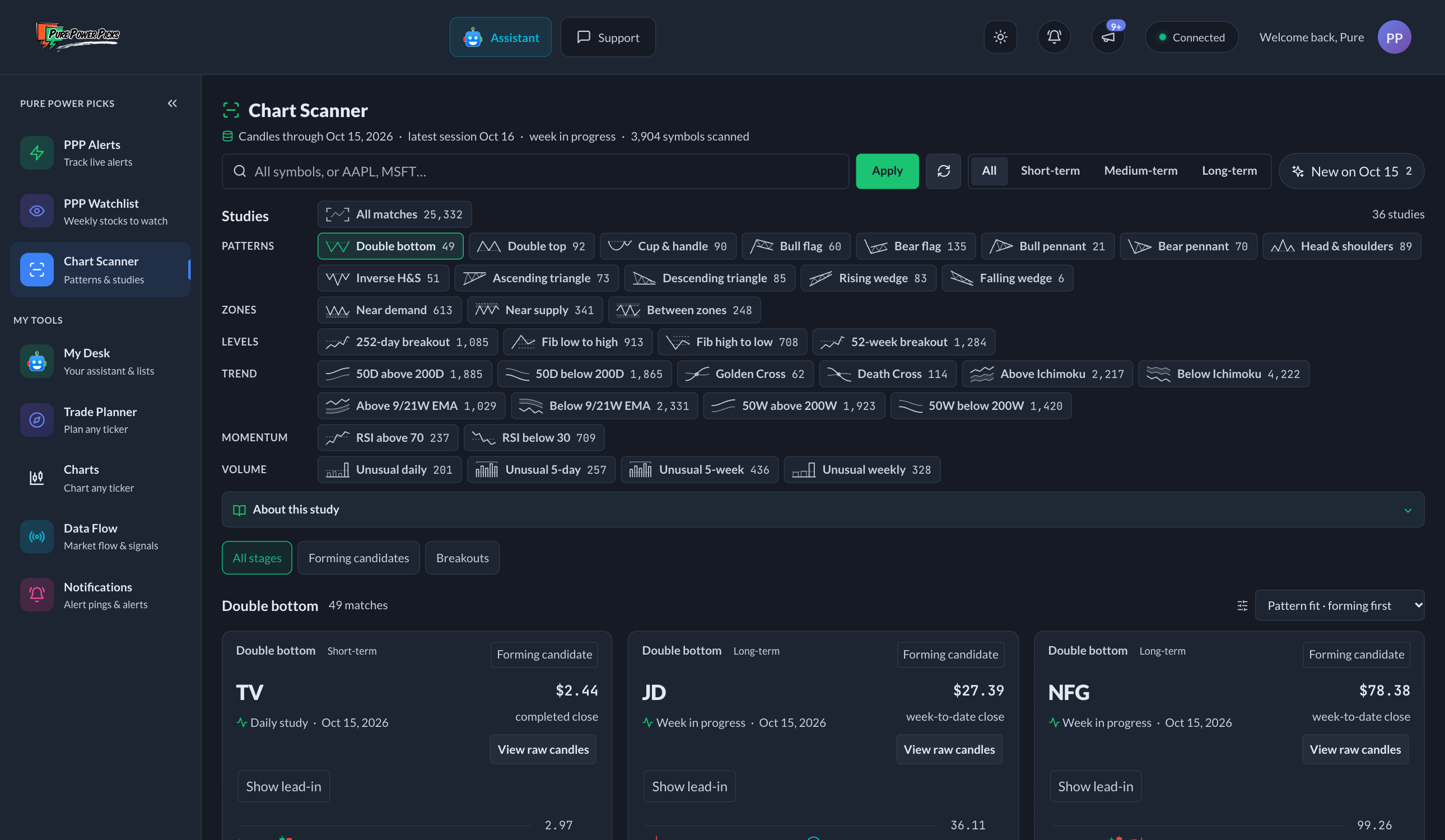
The status line and the row of controls at the top, the study list by kind, then the matching charts.
The top of the page
Under the title, one line shows which close the charts are from, such as As of Friday's close, how many symbols were scanned, and whether a weekly candle is still forming. Closes from the last week go by day name; older ones by date. Hover over it for the exact date. When a newer close has happened but isn't in the scanner yet, the line says so, for example today's close not in yet.
Below that, one row holds the symbol box and the New button:
- Symbols — type up to 40 tickers, for example
AAPL, MSFT, NVDA. An Apply button appears in the box; tap it or press Enter. The × clears the search and shows every symbol again. A stock the scanner skips shows Not in the scanner. - New on [day], such as New on Friday (just New on a phone) — keeps only the studies that started on the latest session (see New studies).
On a phone, the study you are viewing sits under that row; tap Browse to pick another. The circular arrow beside the result count reloads the page's data.
Tap the expand icon at the end of a card's buttons to see its chart full screen. Press Escape, tap outside it, or tap the × to close it.
There is no time frame to pick. Every view mixes daily and weekly charts, short patterns and long ones, and each card says which chart it is on and how long its pattern took to form.
Best matches
Best matches is where the scanner opens. It shows one card per stock: that stock's strict-rule chart pattern with the highest pattern fit.
- Only patterns from the scanner's strict rules count. Looser matches still show in each pattern's own list.
- A pattern needs a pattern fit of 70 out of 100 or better. Pattern fit scores how well a pattern's turning points meet its study's rules, from their spacing, depth and alignment. It is not a full visual grade, so a high score does not promise a picture-perfect chart.
- The highest fit comes first.
- Search a symbol to see that stock's best pattern at any fit.
- Also on this chart lists the stock's other notable studies, such as a nearby demand zone, an RSI reading or unusual volume. Tap one to open that study for the stock.
Pattern fit describes the shape, not what happens next. A clean pattern can still fail.
Studies
The study list starts with Best matches and All matches (every study together), then the studies grouped by kind, one row per kind. A study covers daily and weekly charts together. Each button shows a small drawing of the study, a short name and its match count; the results heading shows the full name. On a phone, tap Browse under the symbol box to open the list, and swipe a row sideways for the rest of it.
| Kind | What it finds |
|---|---|
| Patterns | Double bottoms and tops, cup and handle, bull and bear flags and pennants, head and shoulders, ascending and descending triangles, rising and falling wedges. |
| Zones | Price near a tested demand or supply zone, or between the two. |
| Levels | A close above a prior one-year high, and Fibonacci retracements of a recent swing. |
| Trend | 50- and 200-day (or week) averages, golden and death crosses, the Ichimoku cloud, the 9/21-week EMA band. |
| Momentum | RSI above 70 or below 30. |
| Volume | Unusual volume over a day, five sessions, a week or five weeks. |
Patterns and zones are found by fixed, measured rules. A shape on a chart is not a prediction, so look at the drawing before you rely on one.
When the strict rules find nothing on a chart, the scanner also tries broader versions of them. Those cards carry a Broad match tag. Best matches uses the strict rules only.
Pick a study and open About this study for its guide: what the study is, what the scanner checks, how to read a card, and a textbook drawing of the ideal shape.
Pattern studies add a stage filter: All stages, Forming candidates (the shape is in place, no break yet), and breakouts or breakdowns (a completed close through the pattern's line). On a weekly chart whose week is still open, a break is shown as potential until the week closes.
New studies
The New on [day] button keeps only the studies that started on the latest session. Its count shows before you turn it on.
- A daily study is new on the day it starts.
- A weekly study is new when its week closes, normally on Friday. A week still in progress can change every day, so it is not counted early.
Cards that started on the latest session carry a small New badge in every view.
Reading a card
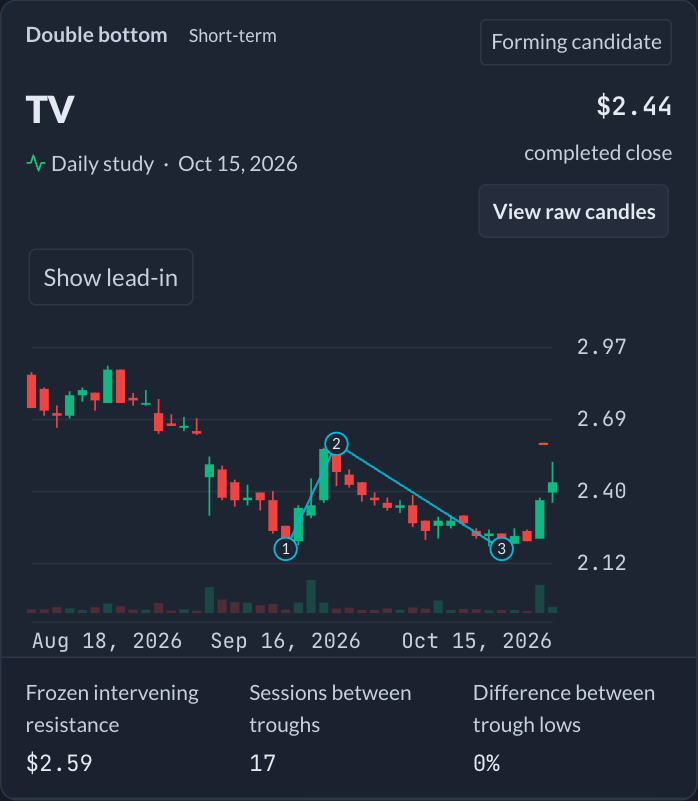
- The top line names the study and, for a pattern, how long it took to form, such as About 5 weeks or About 8 months, from its first turning point to its last. The line below says whether it is a daily or a weekly chart.
- The chart shows the candles the study was measured on. Numbered points mark the highs, lows or closes that define it. Tap one to see its date and price.
- View raw candles hides the lines so you can read the price on its own.
- Zone cards switch between Recent tests (the touches that formed the zone) and Big picture (about two years).
- Reversal patterns open on the pattern itself. Show lead-in widens the view to the move before it.
- Up to three key values sit under the chart, such as the zone edges, the RSI value or the pattern's depth.
A stock that fell a long way may be drawn on a log scale, labeled on the chart, so recent prices stay readable.
Sorting and loading more
- Best matches are always highest fit first.
- In a study, Sort offers newest first, A to Z, or the study's own measure where it has one: nearest zone, highest or lowest RSI, highest relative volume, or best pattern fit.
- More cards load as you scroll down.
Links
Every view has its own address, so you can bookmark it or send it to someone. /chart-scanner opens best matches, /chart-scanner/all every match, and /chart-scanner/double-bottom double bottoms. Adding ?new=1 keeps only the new ones. Older links that named a time frame, such as /chart-scanner/short-term/double-bottom, open the same study.
When it updates
The scanner runs after the close every weekday, on completed candles. Nothing new closes on weekends or market holidays, so on Saturday, Sunday and Monday before the close the page reads As of Friday's close. That is the latest data, not a missed update. Weekly charts include the week in progress until it closes on Friday; their cards say Week to date.