How the Tracker Works
The Alert Tracker is your live scoreboard for every options alert Pure Power Picks puts out. When an alert goes live, the tracker watches the contract and the underlying stock for you — all through the market day — and shows you how the idea is playing out against the original thesis.
You never have to do math, refresh a broker, or guess whether an alert is still on plan. The tracker does it.
What the tracker tracks
For every alert, the system follows two things at once:
- The contract — the option itself. How its price has moved since the alert, its highest recorded price since the alert (the High), and where it stands right now.
- The stock — the underlying company. Whether it's holding above support, pushing toward targets, or breaking the levels that the alert's thesis was built on. This is what drives the status badges.
Prices refresh automatically about every 5 minutes during market hours, so what you see is always current.
The pages you'll use
| Page | What it's for |
|---|---|
| PPP Alerts (home) | The master table of every alert, with live performance, status, and filters. This is where most people live. |
| Alert Detail | Click any alert to open its full page: charts, price levels, thesis, the Opportunity Calculator, and your private notes. |
| Chart Scanner | Chart patterns and studies across thousands of stocks and ETFs, from completed daily and weekly candles. Included with Full Membership. |
| Alert Charts | On PPP Alerts, switch to Charts: every alert as an interactive chart. Sort by recent move, change to High, days to High (DTMO), expiration, or ticker, and star the ones you care about. |
| PPP Watchlist | The weekly curated list of stocks we're watching — and how those picks turn into alerts over time. |
| Notifications | Choose what you get pinged about — new alerts, milestones, and invalidations. |
Finding your way around
- On desktop, the navigation is the sidebar on the left. It collapses if you want more room.
- On PPP Alerts, the Table | Charts switch at the top flips between the alerts table and Alert Charts, every alert as a live chart.
- On mobile, your tools live in the bottom bar: Alerts, Watchlist, Planner, My Desk, Charts, Scanner and Flow. The bar hides while you scroll down and comes back when you scroll up.
- The header (top of every page) has the Pure Power Picks logo (tap to go home), the light/dark switch, your 🔔 alert notifications bell, the 📣 What's New megaphone for product updates, a connection indicator, and your account menu.
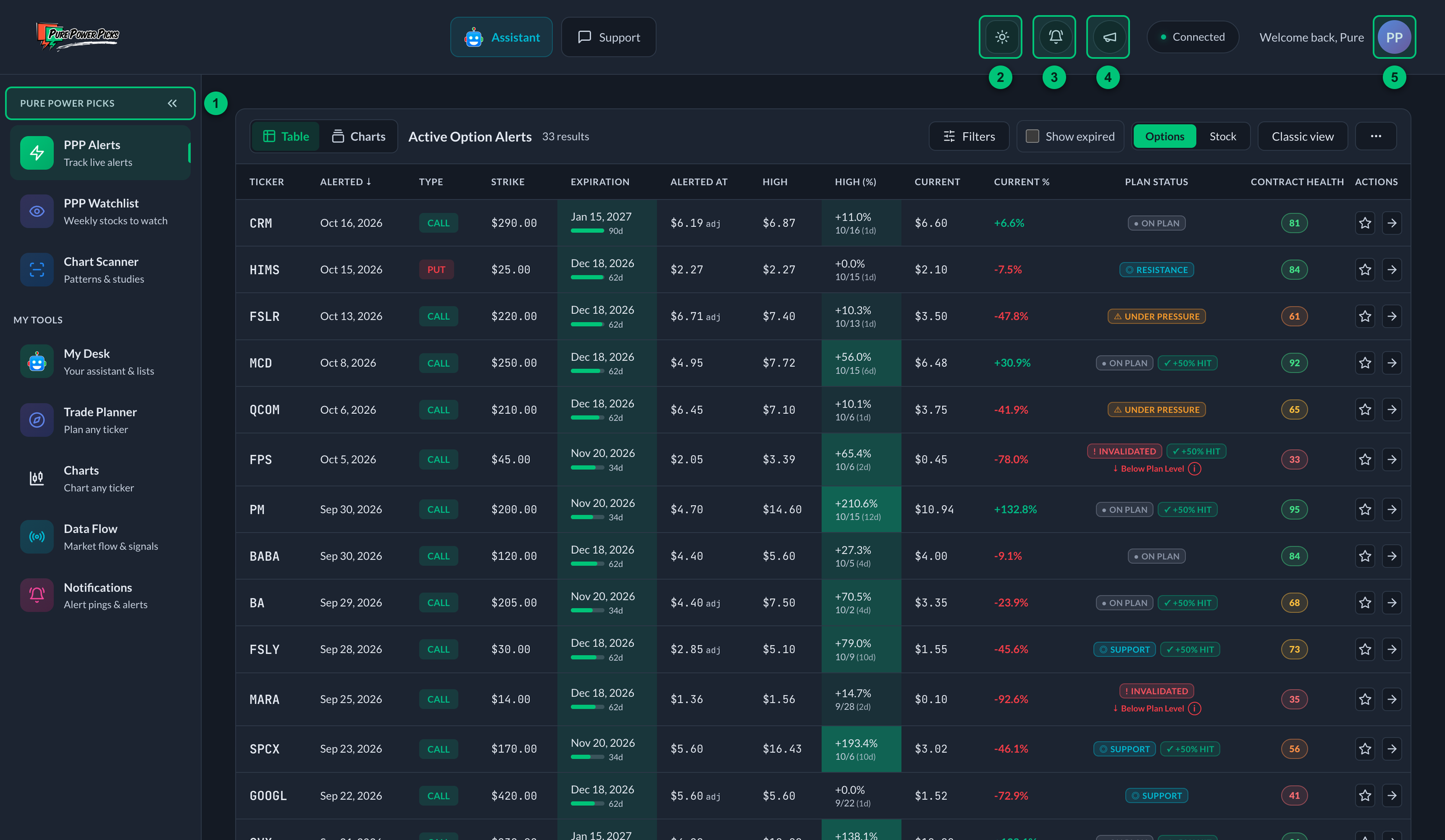
① Sidebar — every page is one click away; the arrows collapse it. ② Light/dark switch — changes the theme on this device. ③ Alert notifications — the bell; events on your alerts. ④ What's New — the megaphone; product updates. ⑤ Account menu — opens from your avatar.
Light mode and dark mode
The tracker comes in dark by default. If you'd rather read it on a light background, you can switch at any time.
- On desktop, tap the sun/moon button in the header, to the left of the bells.
- On mobile, tap your avatar and flip the Dark mode switch. On means dark, off means light.
Your choice is saved on that device and stays put until you change it, so the app opens the way you left it. It's per device — switching on your laptop won't change your phone.
Everything works the same in both: the same pages, the same numbers, the same status colors. Only the background and the ink change.
Reading your first alert — the quick version
- Open the home page. Each row is one alert. While active, read Plan State for the underlying's current condition, then any separate +50% Contract Delivered result. After expiration, the same Status spot leads with Final Review when proven. See Alert Statuses & Final Review.
- Look at High (%) — the best the contract has done since the alert — and Current % — where it stands now. See High.
- Click the row to open the Alert Detail page. Here you'll see the thesis, the exact price levels (support, resistance, targets), charts, and the Opportunity Calculator for exploring what‑if scenarios.
- Want to keep an eye on it? Tap the star to add it to My Alerts — it syncs across your devices.
That's the whole loop. Everything else in these docs is detail on those pieces.
If terms like call, put, strike, ITM/OTM, or implied volatility are new, keep the Glossary open in another tab. It defines every term used in the tracker in plain English.
Everything in the tracker reflects market prices and the original alert thesis — it shows the opportunity an alert presented, not a record of trades you placed or profits you earned. It's an educational tool. Please read the disclaimer.
Locked features
If a feature is not included in your access, a membership card appears over an illustrative workspace preview. The preview uses fictional charts and placeholder rows. Choose View membership options to explore access, or Keep exploring Free to return to Free Access. In iOS regions where purchasing is unavailable, the button offers member sign-in instead.
The Chart Scanner requires Full Membership, so its button reads Explore Full Membership. Alerts-only members keep their alert charts in PPP Alerts.
On Free Access, the PPP Watchlist shows every free watchlist week in full, and each members' week opens for Free Access four weeks after it posts. If you open a members' week before then, for example from a link on the website, a card shows which week it is, how many stocks it has, and the date it opens. See free watchlists takes you back to the weeks you can read now.