Alert Statuses & Final Review
The dashboard uses one Status surface in both Options and Stock view, but it keeps four different facts separate:
- Lifecycle answers whether the attached contract is Active or Expired.
- Plan State answers what the underlying stock is doing relative to the published plan.
- Contract Result records the permanent +50% Contract Delivered achievement.
- Final Review gives the expired contract a plain-English result: Smooth, Dipped first, Deep dip first, or Fell short.
While an alert is active, Plan State leads the Status surface. After expiration, an evidence-backed Final Review leads when one is available; otherwise Expired leads. Expired and +50% Contract Delivered remain separate context, and the frozen Plan State remains available with the plan detail rather than being rewritten as the contract's result.
This separation matters. A contract can pull back first, then deliver +50% and finish with a Dipped first review, while the stock plan's recorded state is Invalidated. All three facts can be true without overwriting one another.
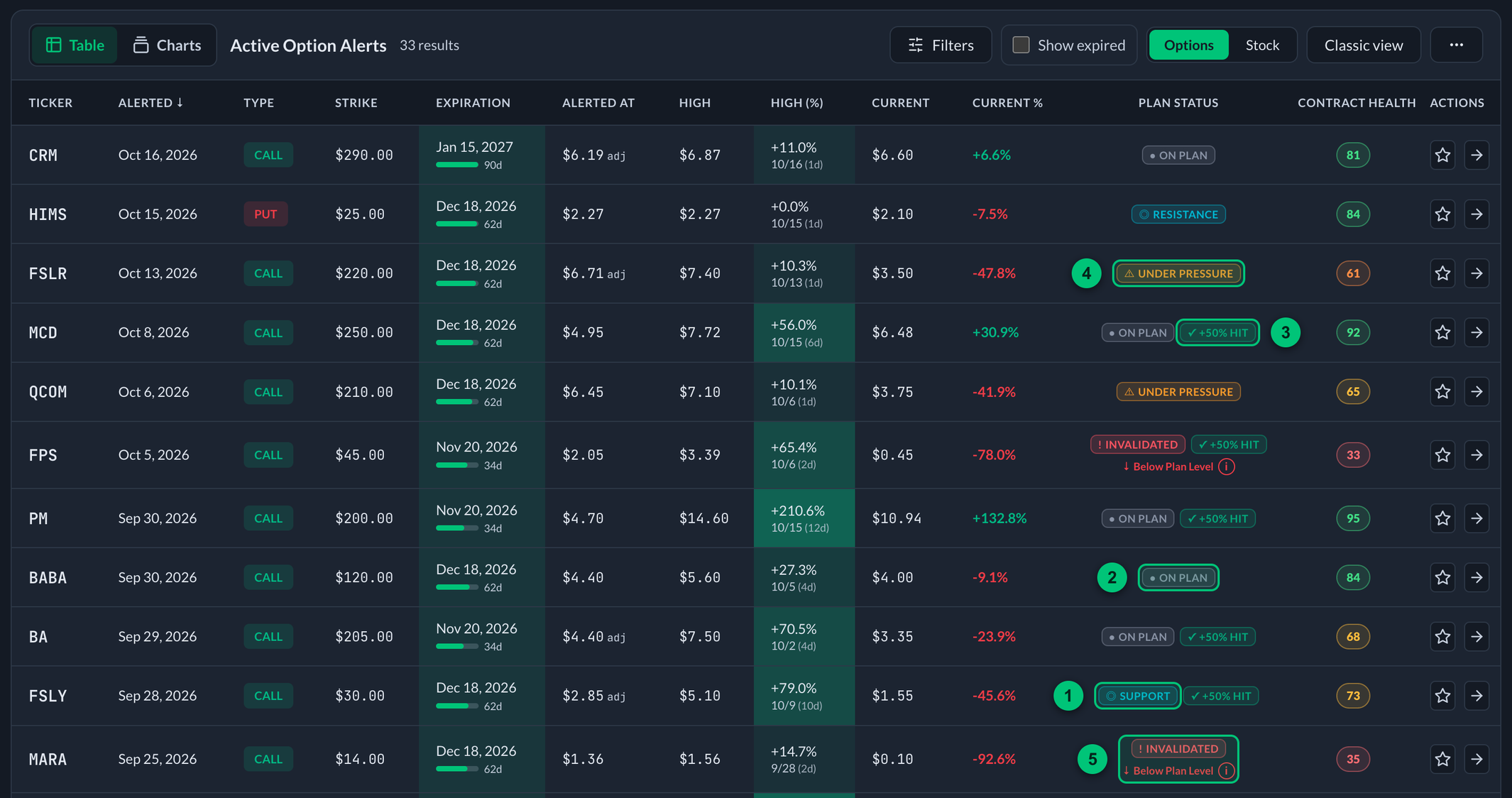
Real rows from the alerts table. Plan State leads each row, and a +50% result sits beside it as its own badge.
① Support — price is inside the published support zone. ② On Plan — price is on the valid side of the invalidation level and outside support. ③ +50% Hit — the permanent +50% Contract Delivered result, shown beside the Plan State. ④ Under Pressure — price has moved beyond support toward invalidation. ⑤ Invalidated — a daily close went beyond the level; the line under it shows price has since reclaimed it.
Plan State
| State | What it means |
|---|---|
| Plan · On Plan | Price is on the valid side of the explicitly published invalidation level and is not inside published support or its pressure area. |
| Plan · Support Zone | Price is inside the exact support range published with the alert. The tracker does not invent a percentage-wide zone around a published level. |
| Plan · Under Pressure | Price has moved beyond support toward invalidation. A live intraday move through the invalidation level also stays here while the tracker waits for daily confirmation. |
| Plan · Invalidated | A daily session closed beyond the exact published invalidation level. This is a confirmed event in the original plan's history. |
| Plan · Unavailable | The structured levels, current quote, alert date, or post-alert history required for a reliable read are missing, inconsistent, or marked for review. The tracker withholds a conclusion instead of calling the plan healthy by default. |
Intraday warning vs. confirmed invalidation
The tracker uses the same rule as PPP notifications:
- A live intraday cross through the exact invalidation level means Under Pressure: the plan is at risk, but the closing evidence is not final yet.
- A daily close beyond that level means Invalidated.
- An intraday wick that recovers by the close does not confirm invalidation.
The tracker does not treat today’s still-forming daily bar—or the live quote—as a close. The current session can confirm only when the delayed full-session feed stores the official daily close with an explicit finalized marker (normally after 4:30 p.m. ET); wall-clock time alone never turns a cached intraday snapshot into a close.
Once confirmed, invalidation remains part of that original alert's record. If price later reclaims the level, the recovery is useful context, but it does not rewrite the original plan as if the confirmed event never happened.
The alert-day daily high and low are not used to prove a historical event because they may have occurred before the alert was published. When a trusted alert time proves the alert was sent before the bell, that day’s closing price may confirm invalidation; its earlier open/high/low still cannot. Older alerts without a trustworthy time begin historical confirmation with the next market session, and the live quote is evaluated separately.
Contract Result
✓ +50% Contract Delivered is a permanent achievement badge. Compact surfaces may shorten it to +50% Hit. It means the tracked option contract recorded a High at least +50% above the alerted price after the alert.
This badge is historical evidence, not a live health signal:
- It remains visible after a pullback.
- It remains visible beside Under Pressure or Invalidated.
- It does not mean the contract is still up 50% now.
- It does not mean every member bought or sold at that price.
The tracker primarily reads the stored +50%, +75%, and +100% milestone latches. For older alerts missing a latch, a recorded change to High of at least +50% can restore the achievement without changing Plan State.
Contract Health
Contract Health is a live 0–100 read on the tracked option contract while an alert is active. Plan State watches the stock against the published plan; Contract Health watches the contract itself.
The score weighs four things:
- Premium condition — how much of the contract's value is intact versus the alerted price.
- Decay burden — how hard time decay is working against the contract each day.
- Directional responsiveness — how much the contract still moves when the stock moves.
- Time runway — how much calendar time the contract has left to work.
The score lands in one of four bands: Healthy, Caution, Weakening, or Poor. A single critical weakness — for example, almost no time left — can cap the score no matter how good the rest looks. Tap or click any score to see each component and exactly why the score is what it is.
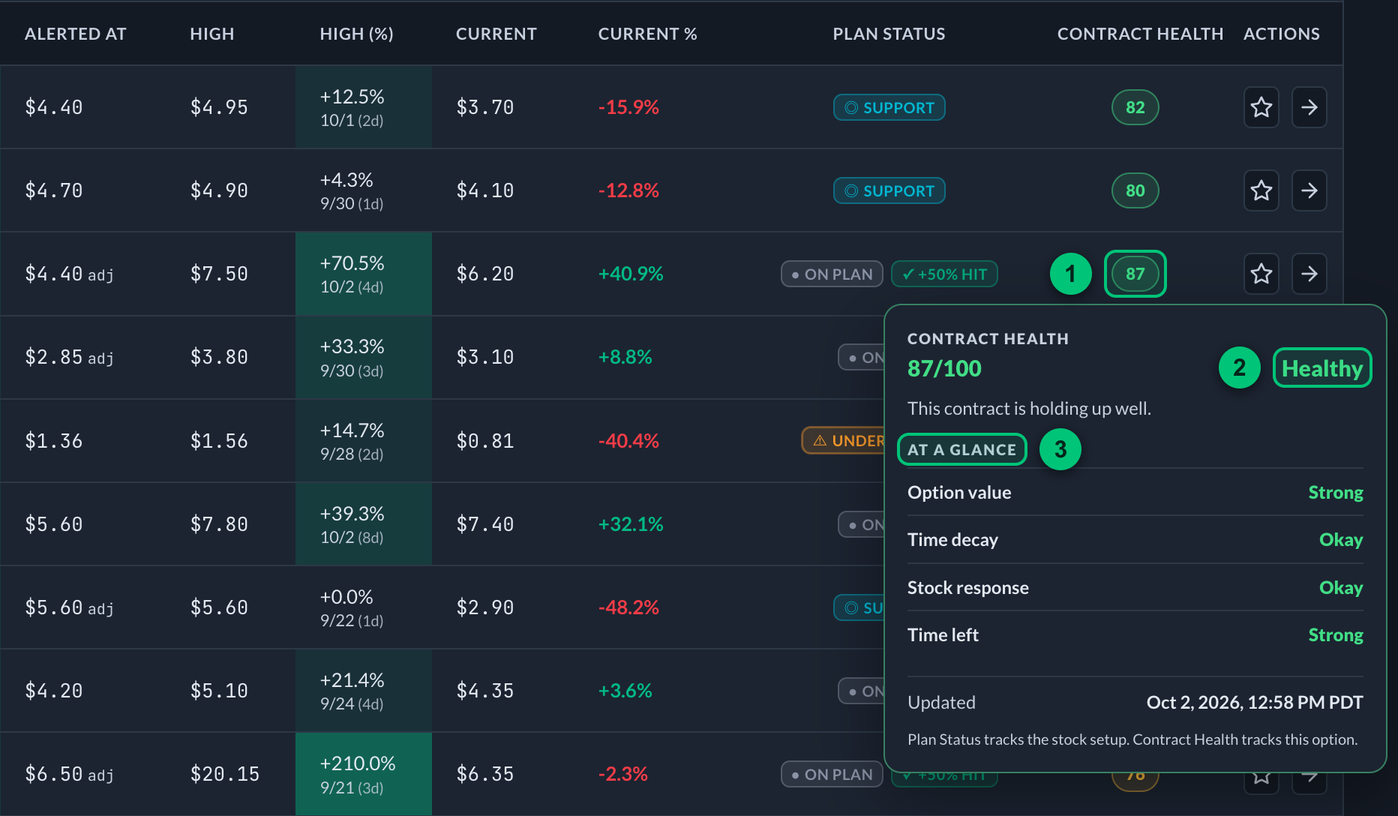
Click a score and its breakdown opens underneath.
① Score — the 0–100 read in the Contract Health column; click it to open the breakdown. ② Band — Healthy, Caution, Weakening, or Poor. ③ At a glance — the four parts of the score, each with its own rating.
Contract Health only appears while the alert is active and current contract data is fresh; when a reliable read is not possible, it shows a dash and says why instead of guessing. Right after the 9:30 a.m. ET open, option quotes are still settling, so scores can show a dash for the first 15 to 30 minutes. They fill in on their own; the tracker refreshes them every few minutes and whenever you come back to it. Like everything in the tracker, it is an educational read on a published idea, not a signal to buy or sell.
Near Expiration and expiration
Near Expiration is an Options-only note shown at 21 days to expiration or fewer. It supplements Plan State; it does not replace it.
After the attached contract expires, Expired supplies lifecycle context. In the shared Status surface, a proven Final Review becomes the primary label; without one, Expired is the fallback. The permanent +50% Contract Delivered achievement remains available. Stock targets, Best Move, the frozen Plan State, and other recorded history remain plan-specific context rather than live post-expiration monitoring.
What data drives Plan State
Automatic Plan State uses the structured fields published with the alert:
- Support zone for CALL plans or resistance zone for PUT plans (
alert_zoneinternally) - Invalidation (
key_level_breach) - Published stock targets
- Current underlying quote
- Eligible finalized daily-close history (including the alert-day close only when a trusted pre-close alert time exists)
- Parse/review evidence for the published levels
Support, resistance, breakout, and targets still appear on the chart and level panel. Plan State does not fabricate invalidation from S2/R2, and a regex guess from thesis prose is not allowed to produce an authoritative badge.
Published stock targets are credited historically once reached. They describe plan progress, but they do not override invalidation or turn into the primary Plan State.
Final Review labels
A Final Review uses complete option-price history through expiration. The result mark is a +50% change to High. After that, the path to the High tells you whether the move ran smoothly or dipped before it got there:
| Final Review | What it means |
|---|---|
| Smooth | Reached +50% or better without a major closing pullback before the peak. |
| Dipped first | Reached +50% or better after a meaningful closing pullback. |
| Deep dip first | Recovered from a deep closing pullback and still reached +50% or better. |
| Fell short | Its best recorded move through expiration stayed below +50%. |
Hover, focus, or tap the label to see the useful facts behind it: Change to High, Biggest pullback, High date, and Tracked from. A short note explains the review window and reminds members that this is the opportunity recorded by the alert, not anyone's personal result.
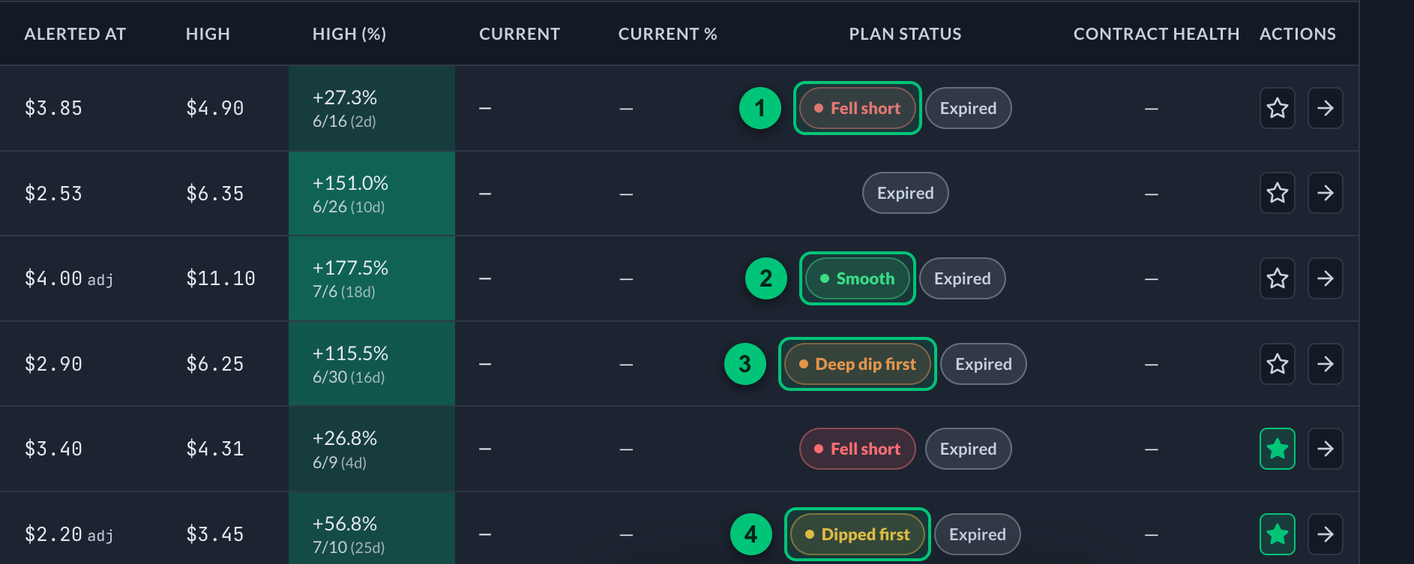
Expired alerts with Show expired turned on. A row with no proven review shows only Expired.
① Fell short — the best recorded move stayed below +50%. ② Smooth — reached +50% or better without a major pullback first. ③ Deep dip first — recovered from a deep pullback and still reached +50% or better. ④ Dipped first — reached +50% or better after a meaningful pullback.
Under the hood, Smooth means the biggest closing pullback before the peak stayed under 20%; Dipped first means 20% to under 55%; Deep dip first means 55% or more. Those boundaries keep every review consistent, but the label and popover use the simpler language above.
Final Review describes the recorded contract path, not what any member bought, sold, or realized. If the tracker cannot prove a complete history, it leaves the alert Expired instead of guessing. Older alerts are not automatically reclassified from incomplete history.
Filtering
The filter separates current state from contract evidence. You can filter by On Plan, Support Zone, Under Pressure, Invalidated, or Plan Unavailable. In Options view, you can also filter for +50% Contract Delivered and Near Expiration.
Plan State describes recorded market data against the published alert structure. It does not know a member's fill, size, exits, risk tolerance, or portfolio, and it is not an instruction to buy, hold, or sell.