My Watchlist
My Watchlist is your own list of stocks you're keeping an eye on. It's got nothing to do with what PPP publishes — put anything on it you want, and jot a note about why.
The PPP Watchlist is the list we put out each week. My Watchlist is yours, private, and can hold any stock you like.
Where it lives
On My Desk, right under the assistant.
Adding a stock
Type the ticker, add a note if you want one, and hit +. The note is just for you — "watching into earnings", "wait for the 50-day", whatever will make sense when you come back to it next week.
Chart anything on the list
Every row has a small chart button. Tap it and the live interactive chart opens over the page for that stock — change the timeframe, add studies, draw on it — then close it and you're back on your list. Anything you draw is saved to that ticker and waiting for you on the Charts page too.
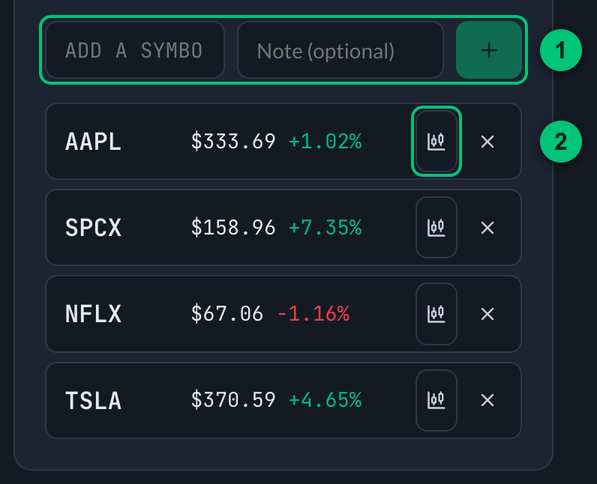
① Add row — the ticker, an optional note, and the + button. ② Chart button — opens the live chart for that stock.
As many lists as you want
You're not stuck with one list. Hit the + next to the list tabs to start another and call it whatever you like — Earnings, Swing, Long term.
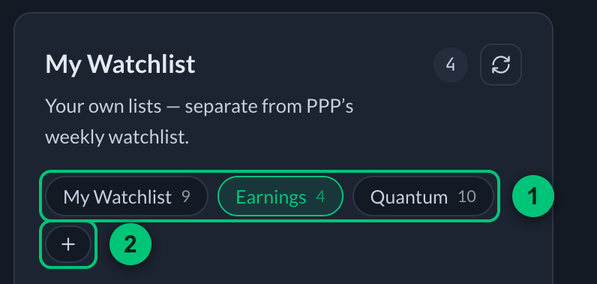
① List tabs — your lists, each with how many stocks it holds. ② + — starts another list.
- Rename and Clear apply to the list you're looking at.
- Your first list is the default. If you don't say which list you mean, that's where a stock goes.
Or just ask
The assistant can do all of this for you. Talk to it normally:
"add NVDA to my watchlist" "add AMD to my earnings list, note: watching the print" "take TSLA off my swing list" "what's on my watchlist?" "make me a new list called Long term"
Name a list that doesn't exist and it'll say so, instead of guessing and putting the stock somewhere you didn't mean.
Private, and on every device
Your lists are tied to your account, so they follow you from laptop to phone. Nobody else can see them, and the assistant can only touch the lists belonging to whoever's signed in.
Keep a short list of what you're actually watching, then ask the assistant "how are the stocks on my watchlist doing today?" instead of going one ticker at a time.